Tuesday, April 28, 2015

How to split string and compare .A function equivalent to locate function in oracle.....

How to split string and compare .A function equivalent to locate function in oracle.....

First  input the string which needs to be split to the following split_str function. This function will split the given string into multiple words depending on the given delimiter.
The return will be an array  of string.

CREATE OR REPLACE function splitinput_str(v_str in varchar2, v_delimiter in varchar2) return t_split_array as
                sarray t_split_array := t_split_array();
  v_tmp varchar2(1000);
begin
  for i in 1 .. length(v_str)
  loop
    v_tmp := regexp_substr(v_str, '[^' || v_delimiter || ']+', 1, i);  
                exit when v_tmp is null;
    sarray.extend;
    sarray(i) := v_tmp;
  end loop;
 
  return sarray;
end;
/

after that we will compare two strings using the below function:-

CREATE OR REPLACE FUNCTION .LOCATE_STRING(source_string VARCHAR2,strs VARCHAR2) RETURN CHAR IS
 -- source_string varchar2(1000) := 'oracle is wonderful language';
  vfound boolean := false;
  --strs varchar2(1000) := '123 oracle bbb';
  string_array t_split_array;
begin
  string_array := splitinput_str(strs, ' ');
  for i in string_array.FIRST .. string_array.LAST loop
    if instr(source_string, string_array(i)) > 0 then
   --If source_string like '%' || string_array(i) || '%'  then
      vfound := true;
    end if;
  end loop;
 
  if vfound then
    RETURN('found');
  else
    RETURN('notfound');
  end if;
end;
/

Tuesday, August 26, 2014

Error PLS-00302: Component must be declared

Error PLS-00302: Component must be declared

select xx.maxno from dual

Where 'maxno' is the function in other schema 'XX'

and we are getting the error PLS-00302.

There are many reasons for this error :-

One can be 'maxno' exists in the current schema
or

SELECT * from all_objects where object_name like 'XX'


If yes this error will come ...so either you have to change the schema name or change the duplicate
object name in your current schema.Hope it will solve your problem...

Sunday, July 13, 2014

Error Frm-40505 :-Unable to perform query..

Error Frm-40505 :-Unable to perform query..

To check this error Press Ctrl+Shift+E. Mostly it is non-database item defined as database..or database item not defined but used in form.

Wednesday, June 18, 2014

How to write format trigger on report based on page number

we can decide what to hide and display in report based on the page number:-
function F_4FormatTrigger return boolean is
 pagenum   number;
begin
  srw.get_page_num(pagenum);
  if pagenum = 1  then
    return (TRUE);
  else
    return (FALSE);
  end if;

end;

Sunday, May 18, 2014

Oracle query optimization tips

Query optimization tips :-

1.Rewrite complex subqueries with temporary tables.

2.Use minus instead of EXISTS subqueries

3.Use SQL analytic functions

4.Re-write NOT EXISTS and NOT EXISTS subqueries as outer joins

5. Index all the comparing columns in query

6.Avoid the use of NOT IN or HAVING

7.Avoid the LIKE predicate

8.Use decode and case

9.Always use table aliases when referencing columns

10.Never mix data types

comparision between regexp_like and like statements

Search using like is always faster than the regexp_like.
REGEXP_LIKE is similar to the LIKE condition, except REGEXP_LIKE performs regular expression matching instead of the simple pattern matching performed by LIKE.
This condition evaluates strings using characters as defined by the input character set.

LIKE syntax for pattern is simple and supports a small set of wildcards,
but does not support the full regular expression syntax.

Whereas the equality operator (=) exactly matches one character value to another, the LIKE conditions match a portion of one character value to another by searching the first value for the pattern specified by the second.
LIKE calculates strings using characters as defined by the input character set

Wednesday, April 2, 2014

how to get the first_date and last_date of the months between the given time period

how to get the first_date and last_date of the months between the given time period

We have a start date and end date given as an input .We have to calculate the number of months and start date ,end date of each month.
The following query is used to calculate the above requirement:-

SELECT ADD_MONTHS(TRUNC(TO_DATE('02-Mar-2014', 'DD-MON-YYYY'), 'MON'), ROWNUM - 1) start_date
,last_day(ADD_MONTHS(TRUNC(TO_DATE('02-Mar-2014', 'DD-MON-YYYY'), 'MON'), ROWNUM - 1) ) end_date
FROM   DUAL
CONNECT BY ADD_MONTHS(TRUNC(TO_DATE('02-Mar-2014', 'DD-MON-YYYY'), 'MON'), ROWNUM - 1)
    <= TRUNC(TO_DATE('29-Jun-2014', 'DD-MON-YYYY'), 'MON')


and the output will be like:-
start_date end_date

01/03/2014|31/03/2014
01/04/2014|30/04/2014
01/05/2014|31/05/2014
01/06/2014|30/06/2014

Tuesday, March 4, 2014

How to display bar-code format value in Oracle reports?

Sometimes some key fields are required to be displayed in a bar-code format. One thing we should have the font bar code 39 .. concatenate the value to be displayed as bar code with '*' .
for example I want to display employee_code as bar code format then in a formula column write '*'||employee_code||'*' and assign this value to the bar code field. Then in the output we can see bar code formatted field value!!

Sunday, February 23, 2014

How to calculate working days for an organization , if the organization works for only a particular number of week in a month

How to calculate working days for an organization , if the organization works for only a particular number of week in a month:-


We will create a function which will take current date of calendar as input and check if this input date's week is same as the one which is required.If yes then we will return '1' else
we will return '0'.

we are removing saturday and sunday as weekends and also we are removing the week with minimum number of working days and then again re-numbering the weeks as per number of days .

IS_DEPARTMENT_WORKING(V_DATE NUMBER,wnum number) RETURN NUMBER IS

cursor c_rec is Select CNT,week_of_month,row_number() over (order by count(*) desc,week_of_month)  from
(select cnt,week_of_month,
MIN(week_of_month) KEEP (DENSE_RANK FIRST ORDER BY cnt) OVER () Lowest
from(select count(*) cnt ,week_of_month ,row_number() over (order by count(*) desc,week_of_month)
from (
select x dt,
(to_char( x+1, 'iw') - to_char(to_date('01/'||to_char(x,'mon/')||to_char(x,'yyyy'),'dd/mon/yyyy') +
1,'iw') + 1)
 Week_of_month
from
(select TRUNC(TO_DATE((V_DATE ,'YYYYMMDD'), 'MONTH')+rownum-1 x
from all_objects
where rownum <= 50
)
where to_char(x,'dy','nls_date_language=english') not in ('sat','sun')
and to_char(x,'mon')=to_char(TO_DATE((V_DATE ,'YYYYMMDD'),'mon'))
group by week_of_month) )
where ((week_of_month<>nvl(lowest,0) AND CNT <5) OR (CNT=5))
GROUP BY CNT,WEEK_OF_MONTH;

cursor c_rec2 is select x dt,
(to_char( x+1, 'iw') - to_char(to_date('01/'||to_char(x,'mon/')||to_char(x,'yyyy'),'dd/mon/yyyy') +
1,'iw') + 1)
 Week_of_month
from
(select TRUNC(TO_DATE((V_DATE ,'YYYYMMDD'), 'MONTH')+rownum-1 x
from all_objects
where rownum <= 35
)
where to_char(x,'dy','nls_date_language=english') not in ('sat','sun')
and to_char(x,'mon')=to_char(TO_DATE((V_DATE ,'YYYYMMDD'),'mon');


cnt_wdays number(5);
wnumber number(2);
worgnumber number(2);
date1 DATE;
wnumber1 number(2);
flg number(1);

BEGIN
                       
           
            open c_rec ;
            open c_rec2;
            loop
            fetch c_rec into cnt_wdays,worgnumber,wnumber;
         
           
             if wnum=wnumber then
                loop
                fetch c_rec2 into date1,wnumber1;
               
                if TO_NUMBER(TO_CHAR(date1,'YYYYMMDD'))=trunc((V_DATE ) and wnumber1=worgnumber
                then
               
                flg:=1;
                exit;
                end if;
               exit when c_rec2%notfound;
                end loop;
                     
             end if;
           
           
            exit when c_rec%notfound;
            end loop;
           
            if flg=1
            then
            RETURN 1;
            else
            return 0;
            end if;
           
END;
/


The first cursor of the function is calculating the week number and removing the smallest week and again reorganizing and renumbering the week.

The second cursor is giving all the dates removing saturday and sunday and their respective week numbers.

Thursday, November 7, 2013

How to escape message no changes to save in Oracle Forms;

There are various ways to solve this issue:-

KEY-COMMIT  trigger :-

BEGIN
  :System.Message_Level := 25;
  COMMIT;
  :System.Message_Level := 0;
END;
and second is at on-error trigger:-
DECLARE
  V_Error_Code       NUMBER;
  V_Error_Text       VARCHAR2 (2000);
 
BEGIN
  V_Error_Code      := Error_Code;
  V_Error_Text      := Error_Text;


  IF V_Error_Code IN (40401, 40405) THEN
   
    NULL;
 
  ELSE
 
    Show_Error (V_Error_Code);
  END IF;
END;

Monday, October 21, 2013

Enquiring the database block based on a text item:

For example you want to enquire a employee record by employee name .
then set the following value in the database where clause and we can enquire the employee record by employee name.

(REGEXP_LIKE (regexp_replace(employee_name,'[[:space:]]*',''),regexp_replace(:b_parameter.employee_name,'[[:space:]]*',''))
or :b_parameter.employee_name is null)

here the :b_parameter.employee_name is the field entered by user for enquiry and employee_name is the dabase column
for the block employee.While executing query it will match the enquired text with the employee name and will
bring the output based on it.

How to use edit_textitem in Oracle forms

For a LOB or CLOB fields its difficult to display the full content in small text box. So in that case
we can always define an EDITOR under editors section of forms and
attach this editor to the text item which is CLOB or LOB.

To call this editor we can write below code:-

Go_Item('block_name.textitem');
Edit_TextItem;

Thursday, October 3, 2013

Calling a loop inside loop for two non-database blocks in form:-

Here the block1 and block2 are non database items and they are not related to each other.
And we have to consider the block1 as master and block2 as detail block. so while reading the data from both the blocks we have to read all the records of block2 for each record of block1 and to achieve that we should write the below loop statement:-


go_block('block1');
first_record;
loop
rec_num:=:system.cursor_record;
if :rnum is not null then
go_block('block2');
first_record;
loop

exit when :block.2from_amt is null;
cnt_case:=GET_TOTAL_COUNT(:block1.rnum,:block2.FROM_AMT,:block2.TO_AMT);

next_record;
end loop;
go_block('block1');
go_record(rec_num);
exit when :system.last_record='TRUE';
next_record;


end if;
end loop;

Wednesday, September 25, 2013

How to import data from excel-sheet to a oracle table using toad

How to import data from excel-sheet to a oracle table using toad:-

Connect to the database and create a table where you want to import the data.

go to the table and right-click ,you will get an option for import data from file.go to execute wizard.

select the file.


select the delimited -character.


see the list of fields.

map the excel fields to database-table columns.

 Atlast execute,and commit. you will find the data will be transferred to the table.


Tuesday, July 23, 2013

Oracle report sub query selection based on parameter value

Oracle report sub query selection based on parameter value:-

minus
IF parameter_value = 'E'THEN
(RUN THIS SELECT QUERY
union
another select query)
ELSE
(RUN THIS SELECT QUERY)
END IF

I tried to use case when but it also gives error in this case

minus
SELECT CASE WHEN parameter_value = 'E' THEN (RUN THIS SELECT QUERY
union
another select query)
ELSE (RUN THIS SELECT QUERY)
END X


so, I found another way for this

minus
(RUN THIS SELECT QUERY
union
another select query where parameter_value='E')

and it works.

Oracle Tuning :Comparison of "Not in" and "minus" in Oracle select query

We have two queries :-

select * from t1
where a.t1 not in (select b from t2)

and other is,

select a from t1
minus
select b from t2


the second query will run very fast while the first one will take longer time.With MINUS, a full scan is done on both tables and the results for t2 are removed from the results for t1.

With NOT IN, a full table scan is done on t1. For each t1 row, a lookup is then done in t2. If no row is found in t2, the t1 row is returned .

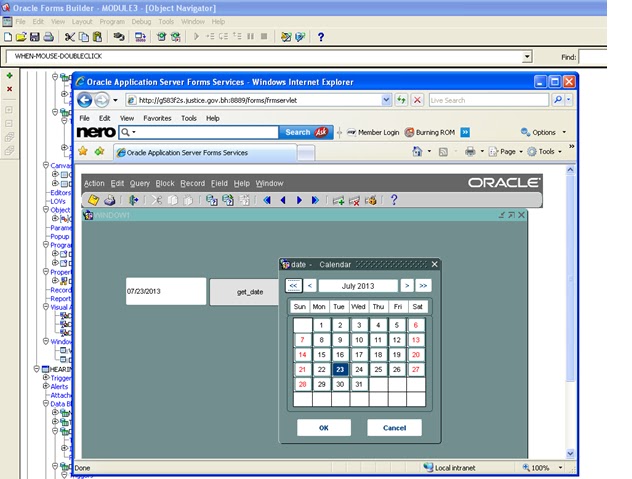
How to attach a calendar to the form


How to attach a calendar to Oracle Form:-

It is one of the method which is widely used to attach calendar to a form.

For this you need certain components like :-
  1. CALENDAR.olb download CALENDAR.olb
  2. Start the Forms Builder and create a new Forms Module.
  3. Open the CALENDAR.olb and double-click on the CALENDAR node in the Object Libraries.
4. From the CALENDAR object library pane, click on CALENDAR and drag and drop it on the Object Groups node of your new form. 
5. Once copied, you can see the following objects in the Forms Object Navigator . 


               6.   Create a new Data Block .Ensure this block appears first in the list before the     DATE_CONTROL_BLOCK and DATE_BUTTON_BLOCK blocks.   
                 7. Add a date field and a button to it.


\
8..       Write the following code to call the calendar in the when-button-pressed trigger of button.


9.   Now compile and run the form.

Wednesday, July 17, 2013

Compare dates in Oracle Forms:-

Compare dates in Oracle Forms:-
Forms will automatically adjust the date format depending on your max length or your format mask. Only thing is, not sure how different NLS settings will affect your individual needs.

The best way to copmare two dates is to convert them into numbers and compare.For eg.

select Emp_code,Emp_name from employee
where to_number(to_char(join_date,'yyyymmdd'))=to_number(to_char(sysdate,'yyyymmdd'))

Sometimes we store the DAY in our database column like Absent_day='MONDAY' and the oracle give different results depending on the nls setting.For eg.
Sometimes ,

select * from employee where absent_day=to_char(sysdate,'DAY') will not work as the nls lang settings are different or other than english.
so in such situations we have to write:-

select * from employee where absent_day=(LTRIM(RTRIM(TO_CHAR(sysdate ,'DAY','NLS_DATE_LANGUAGE=ENGLISH'))

One more comparision is to compare an parameter date with two existing date columns in a table:-
select* from employee_date
where to_number(to_char(:p_e_date,'yyyymmdd'))
between to_number(to_char(employee_date_from ,'yyyymmdd'))
and  to_number(to_char(employee_date_to,'yyyymmdd'));

I hope all the date related comparision must be solved .

Monday, July 15, 2013

Display Oracle Report in Excel/SpreadSheet:-

Display Oracle Report in Excel/SpreadSheet:-

A complete syntax example to run Reports from a browser looks like this:-

http://<server>:<port>/reports/rwservlet? keyname&report=<report>.rdf&desformat=[htmlcss|pdf|xml|delimited|]&destype=cache&paramform=[no|yes]

In the cgicmd.dat file define the keyname as :-

testxls: userid=test/test@testdb destype=cache desformat=spreadsheet %*

DECLARE
REP_NAME varchar2 (2000);
rep_url varchar2 (4000);
BEGIN
                                                             
                                REP_NAME:='d:\ PROJECTS\ code\'||'MYFIRSTREPORT.rdf';                                      
                                rep_url:='http://localhost:8890'||'/reports/rwservlet?testxls&module='||REP_NAME                        
                                ||'&p_emp_code='||:BLOCK_NAME.EMP_CODE;
                                                                                                                                                                                                                             
                                WEB.SHOW_DOCUMENT(rep_url,'_blank');
END;

At runtime the program will ask you to open the excelsheet ,open it and you can see the out put in excel format.

Sunday, July 14, 2013

How to update one oracle table based on condition of other two tables:-


update t1  set t1.code=
(
select t3.code  from  t2 ,t3
where t2.id=t3.id
and t2.fcod=t3.fcod
and t3.mname=t1.mname)
where  t1.code is null